

Table of Contents
- Importance of User-Friendly Login
- Best Practices for Toggle Login Design
- Implementing Passwordless Authentication
- Enhancing Security with Biometric Options
- Addressing Accessibility in Login Design
- Real-World Examples of Effective Toggle Logins
- Conclusion
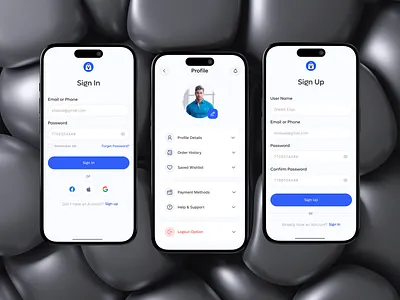
Creating an intuitive and seamless login experience is essential for any mobile application aiming to boost user retention and satisfaction. One effective approach is to implement a toggle login interface that lets users easily switch between the login and registration screens without frustration or confusion. This reduces friction during the authentication process, making it less likely that users will abandon your app. You can explore how toggle login elements are leveraged in top mobile UI designs to make onboarding smoother and more user-friendly. The login process is often the first meaningful interaction a user has with an app. Any confusion or unnecessary complexity at this stage can deter even the most motivated users from signing up or returning to your service. A well-designed toggle login workflow improves usability, boosting conversion rates and long-term engagement.
Importance of User-Friendly Login
Usability is the cornerstone of any effective login flow. A user-friendly login system minimizes frustration, lowers barriers to entry, and helps ensure users remain engaged with your app. Research from Adobe found that users perform authentication tasks about 15 times per typical workday, underscoring the need for simple, efficient design. A seamless login reduces dropout rates, makes a strong first impression, and builds trust in your mobile product. Apps with confusing or lengthy authentication steps risk losing even committed users at the most critical point of entry.
Best Practices for Toggle Login Design
- Clear Differentiation: Make the distinction between “Log In” and “Sign Up” unmistakable, using concise labels and thoughtful placement to avoid confusion.
- Immediate Field Visibility: Display login fields by default rather than hiding them behind multiple taps. Streamlining the journey increases speed and usability.
- Progressive Disclosure: Initially request only the most essential information, such as email and password, or a mobile phone number. Gather additional details after onboarding is complete.
Adhering to these best practices can significantly improve the clarity and efficiency of your app’s entry screen. Consistent icons, simple copy, and logical grouping of form fields all contribute to a less overwhelming and more approachable login process.
Implementing Passwordless Authentication
Modern mobile apps are moving away from traditional password-based authentication toward more secure, user-friendly alternatives. Passwordless authentication, such as passkeys, single sign-on, or magic email links, enhances user convenience while minimizing the risks of forgotten passwords or breaches. Major tech companies are embracing passwordless strategies. For example, Microsoft is phasing out password storage and autofill in its Authenticator app, with full discontinuation set for August 2025. Users are urged to transition to passkeys, a more secure authentication method that relies on biometrics or a PIN tied to individual devices instead of traditional, easily compromised passwords. TechRadar’s article on Microsoft’s transition to passkeys provides more details on this shift.
Enhancing Security with Biometric Options
Biometric authentication technologies, such as fingerprint scanning or face recognition, are now ubiquitous in mobile applications. They provide a fast, frictionless, and highly secure way for users to access their accounts. Over 80 percent of users report feeling more secure with biometric options than with passwords or PINs. Additionally, these features are particularly valuable for users who rely heavily on mobile devices for financial or sensitive applications, where strong security is required without sacrificing convenience. If implemented responsibly, biometric authentication can offer seamless, privacy- and accessibility-aligned authentication. Developers should ensure compliance with platform vendor guidelines and consider user privacy throughout the development process.
Addressing Accessibility in Login Design
Accessible login flows promote inclusivity by making your app usable for the widest range of users, including those with visual, auditory, or motor disabilities. Designing for accessibility requires attention to:
- Color Contrast: Ensure interactive elements and text have sufficient contrast against backgrounds for visually impaired users.
- Text Size: Allow for adjustable font sizes to aid users who need larger or smaller text.
- Assistive Technologies: Test and verify compatibility with screen readers and alternative input devices.
Comprehensive accessibility features not only support compliance with regulations like the ADA but also create better experiences for all users.
Real-World Examples of Effective Toggle Logins
Some leading companies demonstrate the potential of toggled login experiences through their app design:
- Microsoft: Its updated authentication screens feature modern visuals, clear calls-to-action, and multiple secure sign-in methods to ensure simplicity and safety for users worldwide.
- X (formerly Twitter): The platform rolled out global support for passkeys on iOS, providing users with a frictionless, highly secure alternative to passwords, reducing barriers for both sign-in and sign-up.
These examples highlight the importance of continued investment in authentication UX to stand out in a crowded mobile landscape.
Conclusion
An elegantly designed toggle login interface is a crucial asset in today’s mobile app environment. By prioritizing clear differentiation, leveraging passwordless and biometric authentication, and embedding accessibility from the start, developers can deliver frictionless, secure, and inclusive login experiences. A well-designed authentication flow reduces user frustration while enabling faster, more convenient account access across devices. Combining intuitive interface elements with strong security practices ensures users feel confident when interacting with an application. As expectations for digital experiences continue to rise, businesses must balance simplicity with protection against evolving security threats. A modern authentication approach helps build trust, increase conversions, and foster loyalty among an increasingly diverse and security-conscious user base. By continuously improving login experiences through user feedback and emerging technologies, brands can create seamless interactions that support long-term customer relationships.